Author: Paul Sammy – Oracle ACE, 1st March 2026
This Blog will take you through the step by step setup of a Dataguard Pluggable database (DGPDB) setup.
github repo: psammy-github/blog-sql-scripts: Repo for SQL scripts
*No cartoon characters were harmed in the creation of this image
Oracle’s strategic direction toward Multitenant architecture is no longer a gradual transition — it’s the standard. Pluggable Databases (PDBs) are no longer the “new kid on the block.” In Oracle AI 26AI, they are the only kid on the block.
And that shift has some big implications for Disaster Recovery.
The Historical Limitation
In the Multitenant world — up until now — a Data Guard configuration operated at the Container Database (CDB) level.
That meant:
-
Data Guard was configured for the entire CDB.
-
All PDBs within that CDB moved together.
-
You couldn’t selectively fail over or switch over individual PDBs.
-
Disaster Recovery was an “all-or-nothing” operation.
If you wanted granularity at the PDB level? That simply wasn’t possible.
What’s Changed in 26ai (Change was introduced in Oracle 21c)
With Oracle AI 26ai, we can now deploy two primary CDBs, and the PDBs within those CDBs can operate independently as primary or standby PDBs.
This means:
-
A PDB in one CDB can function as a primary.
-
That same PDB can have its own standby in another CDB.
-
Other PDBs in the same CDB can operate differently.
-
Failover and switchover can occur at the PDB level, not just the CDB level.
For anyone running consolidated environments or looking for more granular DR strategies, this is a major shift.
The Lab Setup
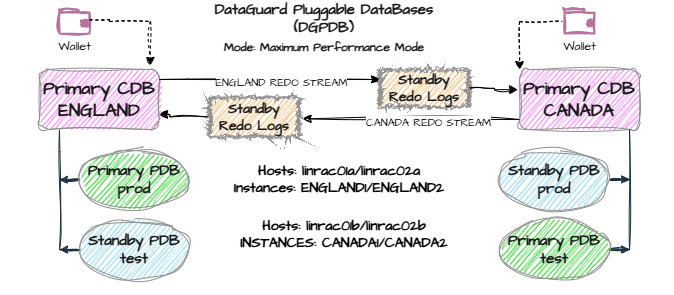
Phase 1: Standard Settings
- SPFILES, ARCHIVELOG mode, FLASHBACK*, FORCE LOGGING,
This is pretty standard for setting up Dataguard.
Lets run STEP1_DGPDB_precheck_setup.sql on both our CDBs
sqlplus / as sysdba @STEP1_DGPDB_PRE_setup_check.sql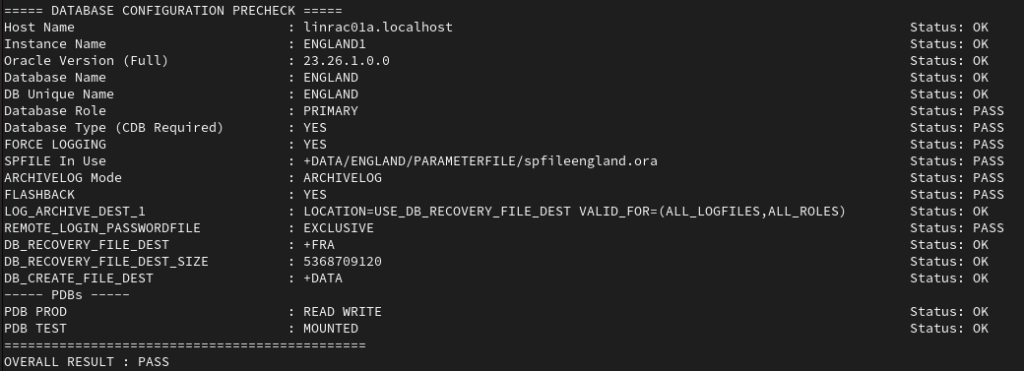
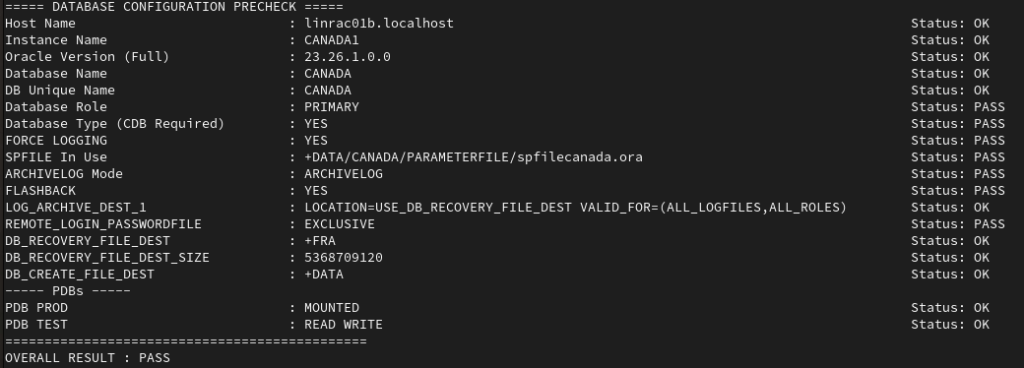
Setup Phase 1 the Archive Destination
Remediating Settings if needed:
- Create SPFILE
create spfile from pfile;
-- restart database- Place database in archive log mode
-- in mount mode
startup mount
alter database archivelog;- Enable force logging
alter database force logging;- Optional but recommended turn flashback database on
alter database flashback on;- Enable use of password file for remote SYS login
alter system set remote_login_passwordfile=EXCLUSIVE scope=spfile;
-- restart database
Phase 2: DGPDB Pre Settings
sqlplus / as sysdba1. Update LOG_ARCHIVE_DEST_1 parameter on both CDBs’
alter system set log_archive_dest_1='LOCATION=USE_DB_RECOVERY_FILE_DEST VALID_FOR=(ALL_LOGFILES,ALL_ROLES)';2. Update STANDBY_FILE_MANAGEMENT on both CDBs’
alter system set standby_file_management = AUTO scope = both;3. Update Dataguard Broker parameters on both CDBs’
- In ASMCMD create directory structure using mkdir
-- ENGLAND cluster
mkdir +FRA/ENGLAND/DATAGUARDCONFIG
mkdir +DATA/ENGLAND/DATAGUARDCONFIG
-- CANADA cluster
mkdir +FRA/CANADA/DATAGUARDCONFIG
mkdir +DATA/CANADA/DATAGUARDCONFIG3a. CDB: ENGLAND
ALTER SYSTEM SET DG_BROKER_CONFIG_FILE1='+DATA/ENGLAND/DATAGUARDCONFIG/dr2england.dat' scope=both sid='*';
ALTER SYSTEM SET DG_BROKER_CONFIG_FILE2='+FRA/ENGLAND/DATAGUARDCONFIG/dr1england.dat' scope=both sid='*';

ALTER SYSTEM SET dg_broker_start=TRUE scope=both sid='*';
3b. CDB: CANADA
ALTER SYSTEM SET DG_BROKER_CONFIG_FILE1='+DATA/CANADA/DATAGUARDCONFIG/dr1canada.dat' scope=both sid='*';
ALTER SYSTEM SET DG_BROKER_CONFIG_FILE2='+FRA/CANADA/DATAGUARDCONFIG/dr2canada.dat' scope=both sid='*';

ALTER SYSTEM SET dg_broker_start=TRUE scope=both sid='*';
Phase 3: Update tnsnames.ora on all nodes
- Sample tnsnames.ora
- We need entries for our CDB and our PDB’s
- My PDB’s are RAC so utilise SCAN and failover
ENGLAND= (DESCRIPTION= (ADDRESS= (PROTOCOL= TCP) (HOST= linrac-scan-a) (PORT= 1521))
	   (CONNECT_DATA= (SERVER= DEDICATED) (SERVICE_NAME= ENGLAND)))

PROD= (DESCRIPTION= (ADDRESS= (PROTOCOL=TCP) (HOST=linrac-scan-a) (PORT=1521))
        (CONNECT_DATA= (SERVER=DEDICATED) (SERVICE_NAME=ENGLAND_prod) (FAILOVER_MODE= (TYPE=select) (METHOD=basic))))

CANADA= (DESCRIPTION= (ADDRESS= (PROTOCOL= TCP) (HOST= linrac-scan-b) (PORT= 1521))
	  (CONNECT_DATA= (SERVER= DEDICATED) (SERVICE_NAME= CANADA)))

TEST= (DESCRIPTION= (ADDRESS= (PROTOCOL=TCP) (HOST=linrac-scan-b) (PORT=1521))
(CONNECT_DATA= (SERVER=DEDICATED) (SERVICE_NAME=CANADA_test) (FAILOVER_MODE= (TYPE=select) (METHOD=basic))))- Don’t forget to test those connections
- TNS Ping CDB DB from each host
tnsping ENGLAND
tnsping CANADA
tnsping PROD
tnsping TEST
Phase 4: Create Oracle Wallets and store CDB sys passwords
create a common directory on all nodes to store the Oracle Wallet
- As user oracle
- Environment should be set for CDB using oraenv
- *I had intended to create these on an ACFS f/s, but have issue on 26AI/OEL9 but had error creating filesystem
- So I used normal o/s filesystem local to each node and created on each node
. oraenvmkdir /u01/app/oracle/wallet
chmod 700 /u01/app/oracle/wallet- Create Wallet
- update CDB name that are referenced in tnsnames.ora
- update password to correct SYS password example below uses “Oracle123!”
mkstore -wrl /u01/app/oracle/wallet -createCredential ENGLAND sys "Oracle123!"
mkstore -wrl /u01/app/oracle/wallet -createCredential CANADA sys "Oracle123!"- Check Wallet Contents
mkstore -wrl /u01/app/oracle/wallet -listCredential- Restart broker on all Instances
alter system set dg_broker_start=FALSE;
alter system set dg_brokder_start=TRUE;- Test Wallet is working
sqlplus /@ENGLAND as sysdbasqlplus /@CANADA as sysdbaPhase 5: Update sqlnet.ora on all nodes
- Need to specify directory used for wallet location example below
WALLET_LOCATION = (SOURCE = (METHOD=file) (METHOD_DATA = (DIRECTORY = /u01/app/oracle/wallet)))
SQLNET.WALLET_OVERRIDE = TRUE
Phase 6: Update Dataguard CDB level configuration
- On one of the CDBs only create the Dataguard CDB level configuration
dgmgrl /@ENGLANDcreate configuration 'ENGLAND' as connect identifier is ENGLAND;
add configuration 'CANADA' connect identifier is CANADA;
enable configuration all;
show configuration;dgmgrl /@CANADAshow configuration;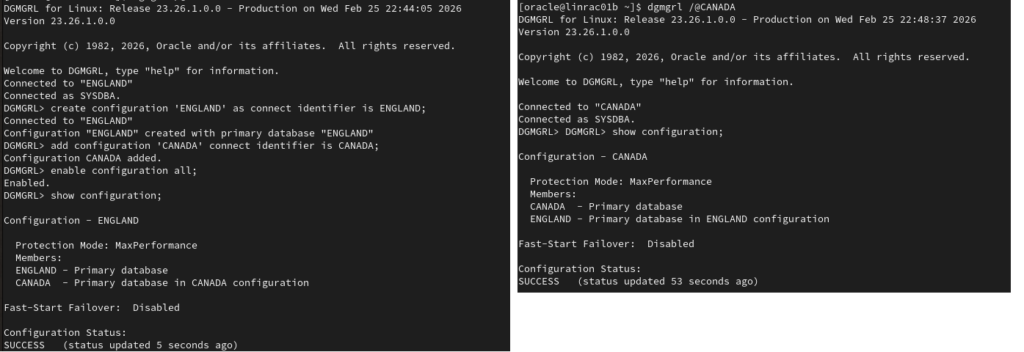
Phase 7: Create new DGPDB_INT user in Dataguard
- Connect to one of the CDB’s only using dgmgrl
- Ensure password is complex enough or will error
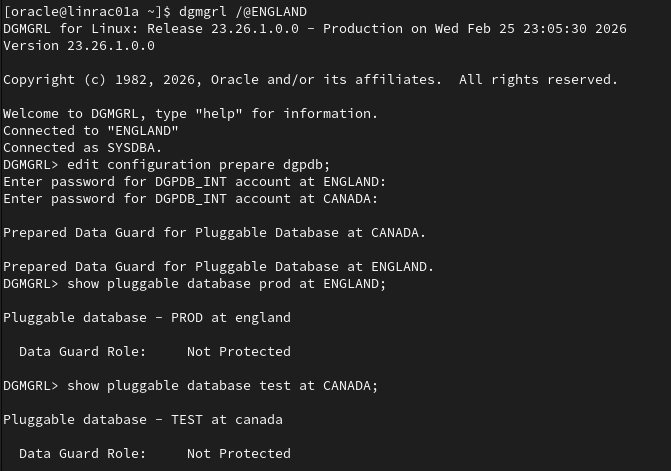
- enter password for new DGPDB_INT user as an example: BatManLovesPDBs##
- Should be complex to beat password rules
- Use the same password for both CDB’s
- Internally each DGPDB_INT user has a dblink created to communicate
- DB_LINK and credential information is stored in data_guard_site$
- If needed the command can be rerun to reset password
dgmgrl /@ENGLANDedit configuration prepare dgpdb;
Phase 8: Update Dataguard PDB level configuration
- This is done before we create the actual standby databases
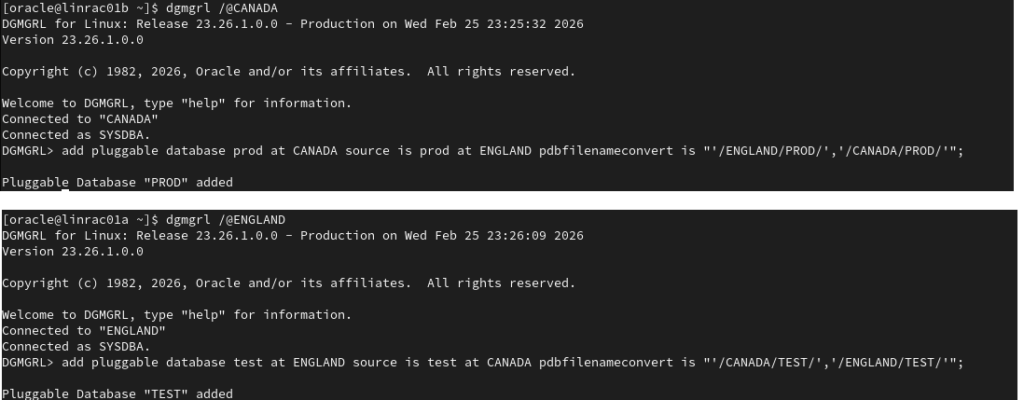
- We must specify a mandatory pdbfilenameconvert parameter to pattern match datafiles coming from primary to standby
- Primary PDB must be open in read write mode
- Run command on the CDB that we are adding the PDB
- Noticed if not done receive “Created process to run a program, but command failed.”
- PDB entries are registered in DGPDB_SITE$
7a. ENGLAND CDB
dgmgrl /@ENGLANDadd pluggable database test at ENGLAND source is test at CANADA pdbfilenameconvert is "'/CANADA/TEST/','/ENGLAND/TEST/'";7b. CANADA CDB
dgmgrl /@CANADA
add pluggable database prod at CANADA source is prod at ENGLAND pdbfilenameconvert is "'/ENGLAND/PROD/','/CANADA/PROD/'";
On Both CDB’s check:
- Its ok to see : ORA-16914: Redo Apply Services were not started at the standby pluggable database.
- As we have not started Redo Apply and the Standby PDB does not exit yet
show pluggable database test at ENGLAND;
show pluggable database prod at CANADA;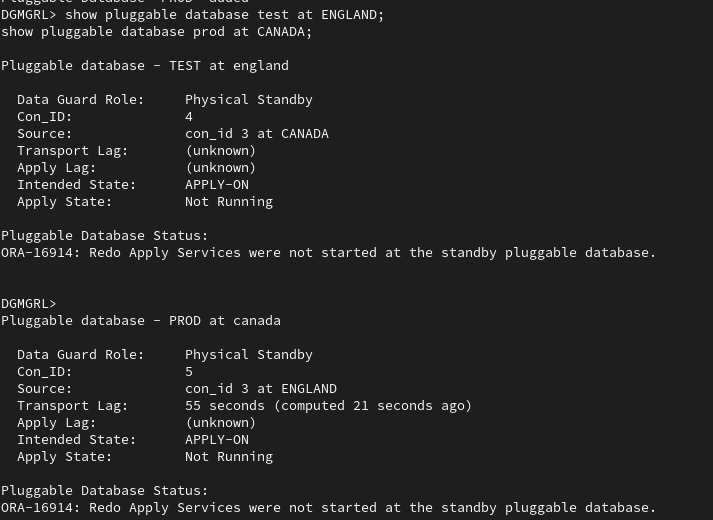
Phase 9: Copy the primary PDB datafiles to the standby PDB using RMAN
8a. Run RMAN script to copy the PDB datafiles from the primary PDB to standby PDB using RMAN, example below:
rman target /@ENGLAND auxiliary /@CANADArun {
backup as copy pluggable database prod auxiliary format '+DATA';
}8c. Rename datafiles
- Review RMAN log to see which datafiles are source and target
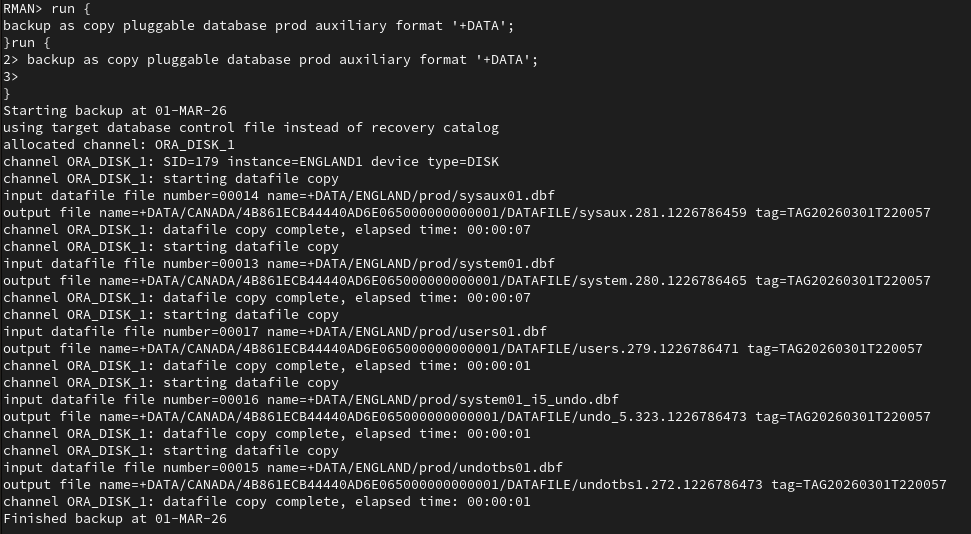
- Rename files based on LOG file example below
- Log on to new standby PDB to check filenames
sqlplus /@CANADA as sysdba- Switch to standby PDB
show pdbsalter session set container=PROD;query file locations which need to be updated
select name from v$datafile;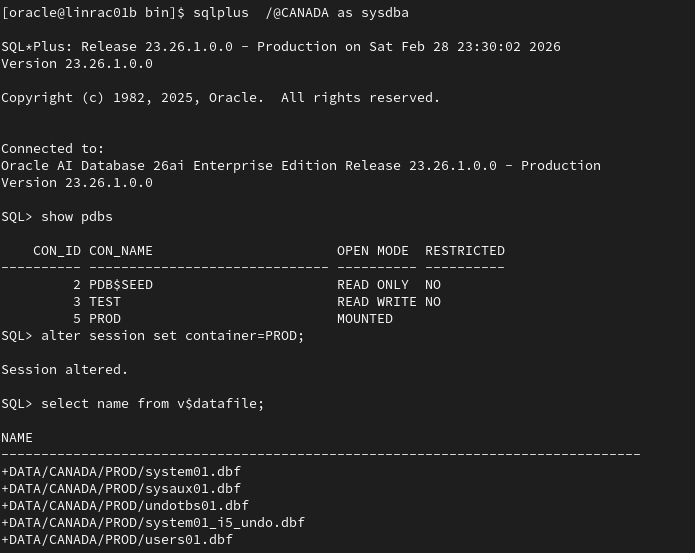
- Based on files in log where you can match file name to the filename for restored file update the database
- we can see standby DB thinks datafiles are in
- +DATA/CANADA/PROD/
- we can see from rman log datafiles were restored to
- +DATA/CANADA/<GUID Hash Value>/DATAFILE/
- Example rename below
- Run SQL inside the Standby PDB
- syntax: alter database rename file ‘<incorrect existing location>’ to ‘rman correct restored location’;
- we can see standby DB thinks datafiles are in
set lines 180
select 'alter database rename file '||''''||name||''''||' to '||''''||'REPLACE WITH NEW RMAN RESTORE NAME'||''''||';'
from v$datafile
order by file#
/

Confirm updated locations
select name from v$datafile;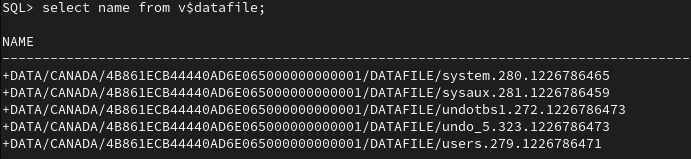
Repeat the same for CDB CANADA
8b. Run RMAN script to copy the PDB datafiles from the primary PDB to standby PDB using RMAN, example below:
- note had to place test in quotes as reserved word below ‘TEST’
rman target /@CANADA auxiliary /@ENGLANDrun {
backup as copy pluggable database 'TEST' auxiliary format '+DATA';
}8c. Rename datafiles
- Review RMAN log to see which datafiles are source and target
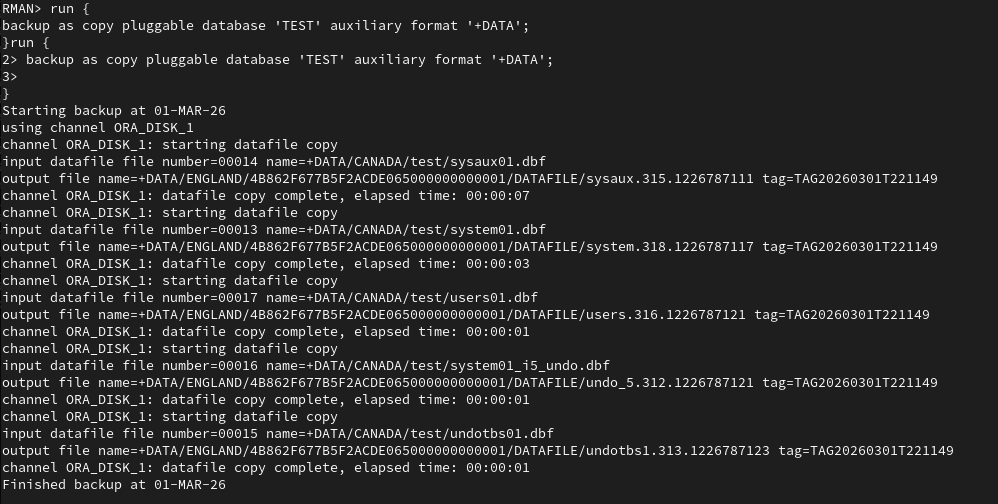
- Rename files based on LOG file example below
- Log on to new standby PDB to check filenames
sqlplus /@ENGLAND as sysdba- Switch to standy PDB
show pdbsalter session set container=TEST;query file locations which need to be updated
select name from v$datafile;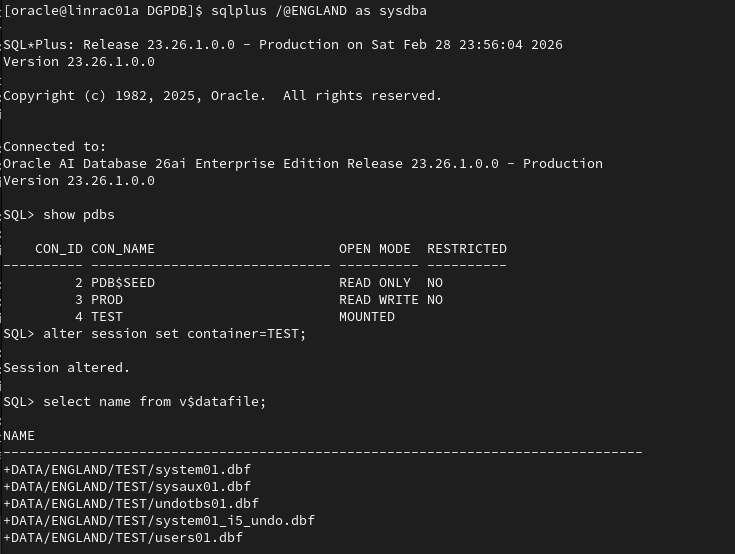
- Based on files in log where you can match file name to the filename for restored file update the database
- we can see standby DB thinks datafiles are in
- +DATA/ENGLAND/TEST
- we can see from rman log datafiles were restored to
- +DATA/ENGLAND/<GUID Hash Value>/DATAFILE/
- Example rename below
- Run SQL inside the Standby PDB
- syntax: alter database rename file ‘<incorrect existing location>’ to ‘rman correct restored location’;
- we can see standby DB thinks datafiles are in
select 'alter database rename file '||''''||name||''''||' to '||''''||'REPLACE WITH NEW RMAN RESTORE NAME'||''''||';'
from v$datafile
order by file#
/
Confirm updated locations
select name from v$datafile;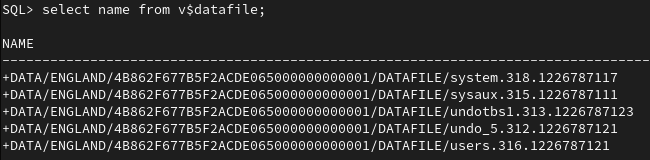
Phase 10: Add Standby Redo logs at PDB level
- Logon to standby PDB test in CDB ENGLAND
- Standby Redo logs are created on PDB not CDB
- Add 1 more log group non multiplexed
- 1 group per thread
- Standby redo logs are visible on PDB but with CON_ID=0
Standby PDB test @ Primary CDB England:
sqlplus /@ENGLAND as sysdbaalter session set container=TEST;
select group#,thread#,bytes from v$standby_log;
ALTER DATABASE ADD STANDBY LOGFILE thread 1;
ALTER DATABASE ADD STANDBY LOGFILE thread 1;
ALTER DATABASE ADD STANDBY LOGFILE thread 1;
ALTER DATABASE ADD STANDBY LOGFILE thread 2;
ALTER DATABASE ADD STANDBY LOGFILE thread 2;
ALTER DATABASE ADD STANDBY LOGFILE thread 2;
select group#,thread#,bytes from v$standby_log;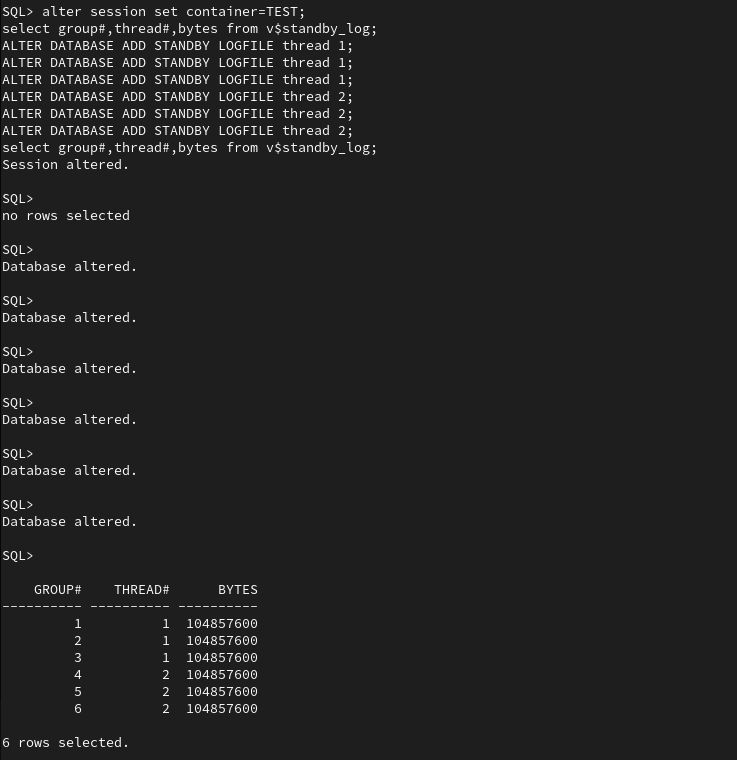
- Logon to standby PDB prod in CDB CANADA
- Add 1 more log group non multiplexed
- 1 group per thread
Standby PDB prod @ Primary CDB Canada:
sqlplus /@CANADA as sysdba
alter session set container=PROD;

select group#,thread#,bytes from v$standby_log;

ALTER DATABASE ADD STANDBY LOGFILE thread 1;
ALTER DATABASE ADD STANDBY LOGFILE thread 1;
ALTER DATABASE ADD STANDBY LOGFILE thread 1;

ALTER DATABASE ADD STANDBY LOGFILE thread 2;
ALTER DATABASE ADD STANDBY LOGFILE thread 2;
ALTER DATABASE ADD STANDBY LOGFILE thread 2;

select group#,thread#,bytes from v$standby_log;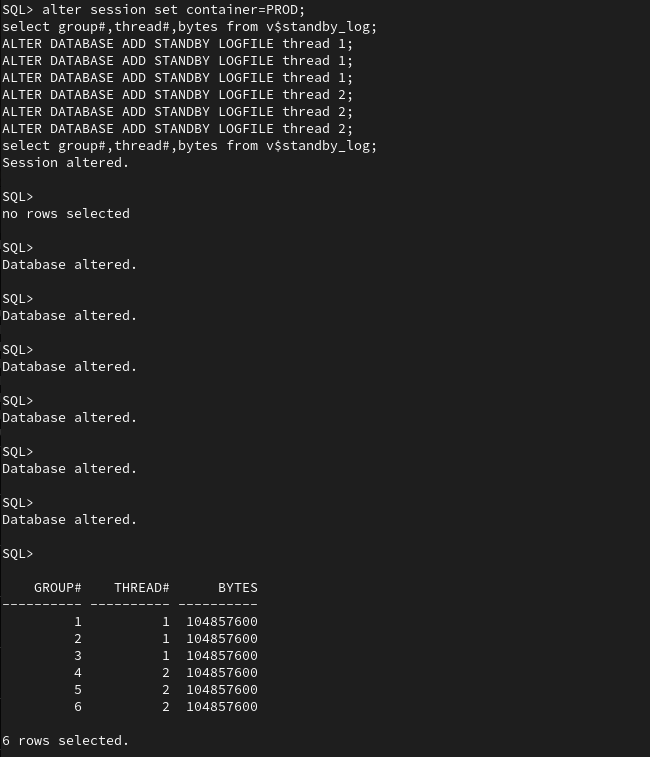
Phase 11: Enable redo apply on Standby PDBs
CDB England
dgmgrl /@ENGLAND <<EOF
edit pluggable database TEST at ENGLAND set state='APPLY-ON';
EOF
sqlplus /@ENGLAND as sysdba <<EOF
alter system archive log current;
alter system archive log current;
EOF- Check and set FAL_SERVER and FAL_CLIENT
CDB CANADA
dgmgrl /@CANADA <<EOF
edit pluggable database PROD at CANADA set state='APPLY-ON';
EOF
sqlplus /@CANADA as sysdba <<EOF
alter system archive log current;
alter system archive log current;
EOF- set FAL_SERVER and FAL_CLIENT, for some reason these were not set by DGBroker
sqlplus /@ENGLAND as sysdba <<EOF
alter system set FAL_SERVER=CANADA scope=BOTH;
alter system set FAL_CLIENT=ENGLAND scope=BOTH;
EOF
sqlplus /@CANADA as sysdba <<EOF
alter system set FAL_SERVER=ENGLAND scope=BOTH;
alter system set FAL_CLIENT=CANADA scope=BOTH;
EOFPhase 12: Health check setup
CDB ENGLAND
- Run parameter post check
sqlplus /@ENGLAND as sysdba @STEP2_DGPDB_POST_setup_check.sql- Check Status in dgmgrl
dgmgrl /@ENGLAND <<EOF
show configuration verbose;
show database ENGLAND;
show pluggable database test at ENGLAND;
validate pluggable database test at ENGLAND;
EOF
- Check logs
- Alertlog
tail -20 $ORACLE_BASE/diag/rdbms/*/$ORACLE_SID/trace/alert_${ORACLE_SID}.log- Dataguard Log
tail -20 $ORACLE_BASE/diag/rdbms/*/$ORACLE_SID/trace/drc${ORACLE_SID}*.logselect * from gv$dataguard_process where con_id in (select con_id from v$pdbs where name in ('PROD','TEST'));
select * from gv$dataguard_stats;select * from DGPDB_SITE$;
select * from data_guard_site$;CDB CANADA
- Run parameter post check
sqlplus /@CANADA as sysdba @STEP2_DGPDB_POST_setup_check.sql- Check Status in dgmgrl
dgmgrl /@CANADA <<EOF
show configuration verbose;
show database CANADA;
show pluggable database prod at CANADA;
validate pluggable database prod at CANADA;
EOF- Check logs
- Alertlog
tail -20 $ORACLE_BASE/diag/rdbms/*/$ORACLE_SID/trace/alert_${ORACLE_SID}.log- Dataguard Log
tail -20 $ORACLE_BASE/diag/rdbms/*/$ORACLE_SID/trace/drc${ORACLE_SID}*.logselect * from gv$dataguard_process where con_id in (select con_id from v$pdbs where name in ('PROD','TEST'));
select * from gv$dataguard_stats;select * from DGPDB_SITE$;
select * from data_guard_site$;Phase 13: Perform switchover of PDBs’

- Switchover from CDB ENGLAND PDB PROD to CDB CANADA PDB PROD
dgmgrl /@CANADAshow pluggable database prod at CANADA;
VALIDATE PLUGGABLE DATABASE prod at CANADA;
SWITCHOVER TO PLUGGABLE DATABASE PROD at CANADA;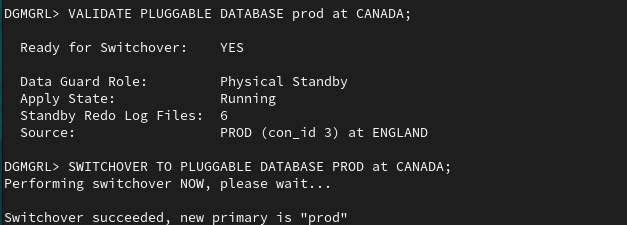
- Switchover from CDB CANDA PDB TEST to CDB ENGLAND PDB TEST
- Clusterware did not seem to open new PDB so open it and optionally save state
sqlplus /@CANADA as sysdba <<EOF
alter pluggable database prod open;
alter pluggable database prod save state;
EOF
dgmgrl /@ENGLANDshow pluggable database test at ENGLAND;
VALIDATE PLUGGABLE DATABASE test at ENGLAND;
SWITCHOVER TO PLUGGABLE DATABASE TEST at ENGLAND;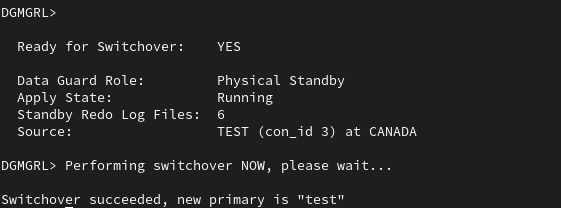
- Clusterware did not seem to open new PDB so open it and optionally save state
sqlplus /@ENGLAND as sysdba <<EOF
alter pluggable database test open;
alter pluggable database test save state;
EOF
DGPDB 26AI Limitations
- DGPDB only supports MAX PERFORMANCE mode
- No more than 2 CDB’s for each configuration
- No cascading standby PDB’s
- Entire redo stream is shipped for whole CDB not just targeted at PDB level
- Does not support automatic block repair
- Can’t reinstate a failover with Flashback
- Does not support Fast Start failover
- Does not support Application Continuity
- Does not support Rolling Maintenance
DGPDB 26AI Features
- Supports Real Time Query
- Supports DML redirect
Remove Dataguard Configuration and Standby Databases
WARNING this is destructive PDBs’ are removed
1a) on CDB ENGLAND
- Swich PDBs’ back to their original CDB
dgmgrl /@ENGLAND
VALIDATE PLUGGABLE DATABASE prod at ENGLAND;
SWITCHOVER TO PLUGGABLE DATABASE PROD at ENGLAND;
VALIDATE PLUGGABLE DATABASE test at CANADA;
SWITCHOVER TO PLUGGABLE DATABASE TEST at CANADA;- Stop Apply process
- Catering for all possibilities
dgmgrl /@ENGLAND <<EOF
edit pluggable database TEST at ENGLAND set state='APPLY-OFF';
edit pluggable database TEST at CANADA set state='APPLY-OFF';
edit pluggable database PROD at ENGLAND set state='APPLY-OFF';
edit pluggable database PROD at CANADA set state='APPLY-OFF';
EOF- Remove Standby PDB and delete datafiles
dgmgrl /@ENGLANDremove pluggable database test at ENGLAND REMOVE DATAFILES;
remove pluggable database prod at CANADA REMOVE DATAFILES;disable configuration ENGLAND;
disable configuration CANADA;
-- must be in correct order
remove configuration CANADA;
remove configuration ENGLAND;

-- show configuration show indicate no configuration exists
show configuration;
1b) On CDB CANADA
dgmgrl /@CANADA
remove configuration CANADA;
show configuration;- Revert SPFILE changes on both CDBs, example below:
- Bounce Database following changes
sqlplus /@ENGLAND as sysdbasqlplus /@CANADA as sysdba
alter system reset LOG_ARCHIVE_CONFIG scope=spfile sid='*';
alter system reset LOG_ARCHIVE_DEST_1 scope=spfile sid='*';
alter system reset LOG_ARCHIVE_DEST_STATE_2 scope=spfile sid='*';
alter system reset DG_BROKER_START scope=spfile sid='*';
alter system reset DG_BROKER_CONFIG_FILE1 scope=spfile sid='*';
alter system reset DG_BROKER_CONFIG_FILE2 scope=spfile sid='*';
alter system reset STANDBY_FILE_MANAGEMENT scope=spfile sid='*';
alter system reset FAL_SERVER scope=spfile sid='*';
alter system reset FAL_CLIENT scope=spfile sid='*';
Bounce both databases
srvctl stop database -db ENGLAND
srvctl start database -db ENGLAND
srvctl stop database -db CANADA
srvctl start database -db CANADAReferences
https://mylearn.oracle.com/ou/course/oracle-ai-database-data-guard-administration
Set up an Oracle Data Guard at the Pluggable Database Level
Oracle Data Guard per Pluggable Database is available today! | maa
Oracle Data guard per-PDB (DGPDB) in 23ai – DatabaseVerse: Journey into the World of Databases
DG PDB : Oracle Data Guard per Pluggable Database in Oracle Database 21c (21.7 Onward) – ORACLE-BASE