Author: Paul Sammy Oracle Ace 9th March 2026

Flashback Database, introduced in Oracle 10g Enterprise Edition, allows rewinding the entire database to a previous SCN or timestamp. Since Oracle 12c Release 2, this capability extends to individual pluggable databases.
When a database is in Flashback mode, it generates extra supporting files to allow a flashback operation called Flashback logs. Prior to 26ai/23c a user could not specify a separate location that differed from the backup recovery location. So Flashback logs were stored in the same place as Archive Logs and Backups.
Flashback logs and archive logs are both high‑throughput sequential write workloads. When they share the same FRA disks, I/O contention can occur. Oracle 26ai/23c introduces dedicated flashback log placement to reduce this contention and improve flashback performance.
This blog will detail the new Flashback Log Placement option and provide an example on how to implement this.
Pre Oracle 26ai/23c parameters for Flashback Log placement and size
- db_recovery_file_dest
- root location of the Fast Recovery Area (FRA), containing archive logs, backups, control file copies, and flashback logs (pre‑26ai)
- db_recovery_file_dest_size
- The size allocated to the FRA Recovery files
- db_flashback_retention_target
- best‑effort retention window in minutes
- Oracle may reduce it under space pressure
New Oracle 26ai/23c parameters for Flashback Log placement
- db_flashback_log_dest
- ASM or filesystem location for flashback logs only
- db_flashback_log_dest_size
- The size allocated for flashback logs, independent of FRA size
- These parameters are CDB‑level only and must match across RAC instances
- we can’t set this at the pluggable database level
- They override FRA placement for flashback logs only
Demo Setup new 26ai Flashback Log placement on a 2 node Oracle RAC database
Step1 : Create a new ASM Disk Group named FLASHBACK to contain the flashback logs
. oraenv <<< +ASM1
sqlplus / as sysasmselect path, header_status, mode_status, os_mb from v$asm_disk
where header_status<>'MEMBER';

CREATE DISKGROUP FLASHBACK EXTERNAL REDUNDANCY DISK 'ORCL:DISK04' SIZE 20479M;The Disk Group must be mounted on all ASM instances before enabling flashback log placement
alter diskgroup FLASHBACK mount;Check Diskgroup is present and mounted on all ASM instances
select inst_id, group_number, name, state from gv$asm_diskgroup where name='FLASHBACK' order by inst_id;Step2 : Pre Flashback Log Placement checks
- Set Database environment
. oraenv <<< Instance-Name- Logon to db as sys using sqlplus
sqlplus / as sysdba- review current setup
set lines 180
select name, log_mode, flashback_on, force_logging from v$database;
col name for a50
col value for a30
select name, value from v$parameter where name like 'db_flashback%' or name like 'db_recovery%'
order by 1;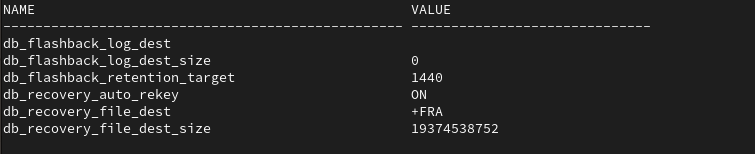
- Determine Estimated Flashback sized needed to set parameter
select flashback_size, estimated_flashback_size from v$flashback_database_log;
- Compatible parameter must be 19.0.0 or higher
show parameter compatible
Above we can see
- Database is in flashback and archivelog mode (archivelog mode is mandatory for flashback database)
- Database is using the non flashback log placement parameters db_recovery_file_dest
- The Estimated Flashback size needed for the flashback target of 1440 Minutes is only ~140Mb
- Though this is a test db that is not used, but we can use this view to help determine a suitable value.
- Database compatible parameter is higher than 19.0.0
Step3 : Update Database to use Flashback Log Placement
- Set Database environment
. oraenv <<< Instance-Name- Logon to db as sys using sqlplus
sqlplus / as sysdba- We need to disable Flashback before we set the parameters
- WARNING flashback database will be disabled and not usable while you perform the change
- Any previous flashback logs will be removed
- WARNING flashback database will be disabled and not usable while you perform the change
select instance_name, host_name from v$instance;alter database flashback off;- Drop any restore points as these will hold on to old flashback logs
- WARNING you will not be able to use dropped restore points once dropped
- The supporting flashback logs will be deleted
- use: DROP RESTORE POINT <restore point name>
- WARNING you will not be able to use dropped restore points once dropped
select name from v$restore_point;- Set new size allowed for Flashback Logs
- Base it on value earlier from v$flashback_database_log as a minimum
- Can use units: K, M, G
alter system set db_flashback_log_dest_size = 10G;- Set new location for Flashback Logs
alter system set db_flashback_log_dest = '+FLASHBACK';- Turn Flashback database back on
alter database flashback on;Step4 : Post Flashback Log Placement checks
- Set Database environment
. oraenv <<< Instance-Name- Logon to db as sys using sqlplus
sqlplus / as sysdba- review current setup
set lines 180
select name, log_mode, flashback_on, force_logging from v$database;
col name for a50
col value for a30
select name, value from v$parameter where name like 'db_flashback%' or name like 'db_recovery%'
order by 1;
- View new flashback log locations
select name from v$flashback_database_logfile;
