Author: Paul Sammy Oracle Ace 11th March 2026
This blog will detail Oracle 26ai new feature that allows tables to have upto 4096 columns.
We’ve all been there (joking) having to create a table with over 1000 columns only to receive:

In reality, I’ve never worked with such tables, but there does seem to be some justification for their existence:
- ML datasets can often have thousands of dimensions
- IoT sensor arrays may produce extremely wide records
- Data migration from NoSQL or columnar systems often results in wide schemas
Also Table changes and Table attributes that may not at first seem obvious add towards the total column count. This includes:
- Virtual columns
- Hidden columns
- Dropped columns
- Columns added by Oracle features like row movement and compression metadata
Demonstration of the 1000 column limit on Oracle 19c
- Run the below pl/sql block to try to create a table named WIDE_TABLE_1001 with 1001 columns it will fail under Oracle 19c or earlier with ORA-01792
declare
  p_num_columns  number        := 1001;                     -- number of columns
  p_table_name   varchar2(200);                             -- will be generated
  v_sql          clob;
begin
  -- build the table name dynamically
  p_table_name := 'WIDE_TABLE_' || p_num_columns;

  -- start building the SQL
  v_sql := 'create table ' || p_table_name || ' (';

  for i in 1 .. p_num_columns loop
    v_sql := v_sql || 'col' || i || ' number';
    if i < p_num_columns then
      v_sql := v_sql || ',';
    end if;
  end loop;

  v_sql := v_sql || ')';

  execute immediate v_sql;
end;
/
So in pre Oracle 26ai the maximum number of columns a table can have is 1000, I notice error message indicates this holds true for a view as well.
- Run the below pl/sql block to try to create a view named WIDE_VIEW_1001 with 1001 columns it will fail under Oracle 19c or earlier with ORA-01792
declare
  p_num_columns  number        := 1001;                     -- number of columns
  p_view_name    varchar2(200);                             -- will be generated
  v_sql          clob;
begin
  -- build the view name dynamically
  p_view_name := 'WIDE_VIEW_' || p_num_columns;

  -- start building the SQL
  v_sql := 'create or replace view ' || p_view_name || ' as select ';

  for i in 1 .. p_num_columns loop
    v_sql := v_sql || i || ' as col' || i;
    if i < p_num_columns then
      v_sql := v_sql || ', ';
    end if;
  end loop;

  v_sql := v_sql || ' from dual';

  execute immediate v_sql;
end;
/
Oracle 26ai Wide Table enhancement
Oracle 26ai allows us to increase the previous 1000 column limit to 4096 columns!
We will need to make several database configuration changes in order to be able to do this:
- Compatible parameter must be a minimum 23.0.0
- New database parameter MAX_COLUMNS
- default value : STANDARD, which allows upto 1000 columns per table or view
- use value: EXTENDED, which allows upto 4096 columns per table or view
- Parameter is not dynamic so requires database bounce
- Parameter is PDB level modifiable
- All RAC Instances must have the same setting
Oracle 26ai Wide Table demo on a PDB
Check current settings for COMPATIBLE and MAX_COLUMNS
col name for a20
col value for a20
select name, value from v$parameter where name in ('compatible','max_columns') order by 1;
On my PDB we have compatible >= 23.n.n so we have the potential to use Wide Tables, but the max_columns is set to STANDARD so the feature is no enabled yet.
Lets try to create a Table with 1001 cols to confirm it fails
declare
  p_num_columns  number        := 1001;                     -- number of columns
  p_table_name   varchar2(200);                             -- will be generated
  v_sql          clob;
begin
  -- build the table name dynamically
  p_table_name := 'WIDE_TABLE_' || p_num_columns;

  -- start building the SQL
  v_sql := 'create table ' || p_table_name || ' (';

  for i in 1 .. p_num_columns loop
    v_sql := v_sql || 'col' || i || ' number';
    if i < p_num_columns then
      v_sql := v_sql || ',';
    end if;
  end loop;

  v_sql := v_sql || ')';

  execute immediate v_sql;
end;
/
Enable Wide Table functionality
- Update SPFILE logged on as sysdba
alter system set max_columns=EXTENDED scope=spfile;- Bounce Pluggable database logged on as sysdba
alter pluggable database close immediate;
alter pluggable database open;- Confirm new settings
col name for a20
col value for a20
select name, value from v$parameter where name in ('compatible','max_columns') order by 1;
- Retry creating a table called WIDE_TABLE_1001 with 1001 columns
declare
  p_num_columns  number        := 1001;                     -- number of columns
  p_table_name   varchar2(200);                             -- will be generated
  v_sql          clob;
begin
  -- build the table name dynamically
  p_table_name := 'WIDE_TABLE_' || p_num_columns;

  -- start building the SQL
  v_sql := 'create table ' || p_table_name || ' (';

  for i in 1 .. p_num_columns loop
    v_sql := v_sql || 'col' || i || ' number';
    if i < p_num_columns then
      v_sql := v_sql || ',';
    end if;
  end loop;

  v_sql := v_sql || ')';

  execute immediate v_sql;
end;
/
Confirm number of columns for table WIDE_TABLE_1001
select count(*) from dba_tab_cols where table_name='WIDE_TABLE_1001';
Reverting tables max_columns back to default of STANDARD
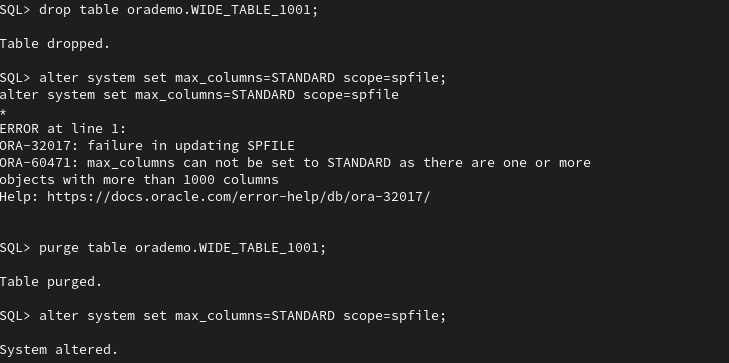
We can change the parameter max_columns back to the default value of STANDARD but only if no tables or views will over 1000 columns exists, attempting to do so will result in an error as below:
alter system set max_columns=STANDARD scope=spfile;
So if safe to do so drop the offending object(s) then perform the parameter revert.
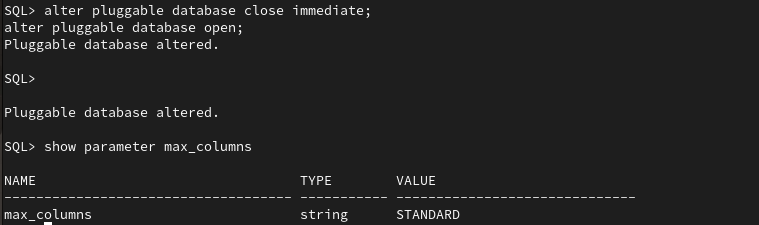
Notice, below even though the offending table was dropped, as this database is using a recyclebin we had to also purge the table from the recyclebin for the database to be 100% clear of any offending objects;