Author: Paul Sammy Oracle Ace 25th March 2026
Why database naming matters
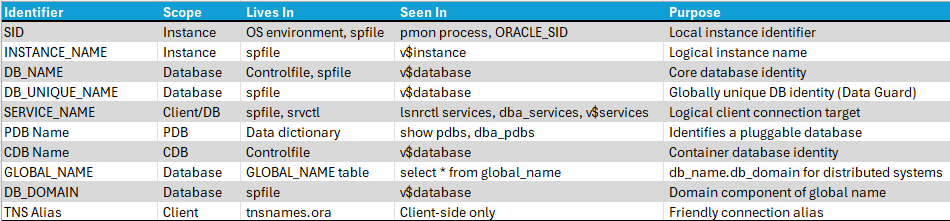
Oracle databases use several different names, each serving a specific purpose. Understanding how they relate is essential for connections, administration, RAC, and Data Guard.
Concepts
lets try and visualise this in the diagram below we have 2 RAC sites replicating using Dataguard for a single database.
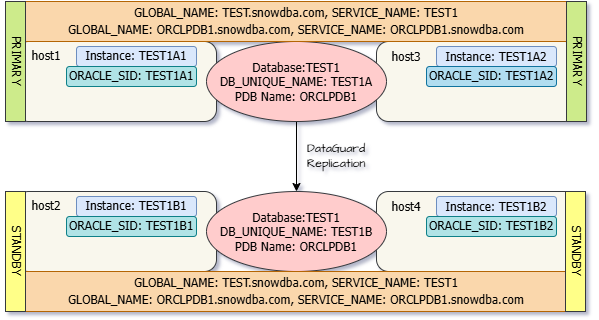
- The container database is called TEST1 (db_name)
- The RAC instances are called (instance_name)
- on the Primary are: TEST1A1, TEST1A2
- on the Standby are: TEST1B1, TEST1B2
- The Dataguard Name for Database (db_unique_name)
- on the Primary is : TEST1A
- on the Standby is : TEST1B
- The Pluggable Database (PDB) name: ORCLPDB1 on all sites
Lets walk though how a database name evolves:
Step1 Set you Environment (Unix)
- The SID is short for System Identifier this will be the same as the instance name
- Pre RAC setup and Pre Dataguard setup this is as simple as the SID is
export ORACLE_SID=TEST1The SID also with Oracle Home are what allows you to connect to Oracle using a bequeath connection, basically without using the listener to connect directly to the Oracle database.
Step 2 The pfile/spfile
- The parameter file will define the database name using db_name
- The database network name will optionally be defined by using db_domain (optional)
- These parameters once set will not generally change and will be the same irrespective of if the database later becomes part of a RAC or Dataguard Setup
db_name = TEST1
db_domain = snowdba.com
Step 3 Create the database
- When we create a database we specify a database name this must match the db_name specified in the pfile/spfile
CREATE DATABASE TEST1At this point
- We only have a single instance no PDBs, non RAC, non Dataguard so normally*:
- ORACLE_SID = DB_NAME = INSTANCE_NAME = DB_UNQUE_NAME = TEST1
- SERVICE_NAME = GLOBAL_NAME = TEST1.snowdba.com
*typically this is true but in reality could differ
Step 4 Add a pluggable database
CREATE PLUGGABLE DATABASE ORCLPDB1 ADMIN USER Walter IDENTIFIED BY HeisenbergAt this point
- ORACLE_SID = DB_NAME = INSTANCE_NAME = DB_UNQUE_NAME = TEST1
- SERVICE_NAME = GLOBAL_NAME = TEST1.snowdba.com
- We now have a Pluggable Database: ORCLPDB1
- SERVICE_NAME = GLOBAL_NAME = ORCLPDB1.snowdba.com
Step5 Add a second node to create a RAC database on the Primary Site
- We will now have 2 Unix hosts running uniquely named Oracle Instances referencing the same physical database files on clustered storage
host1 + host3 # using odd numbers for Primary SiteAt this point
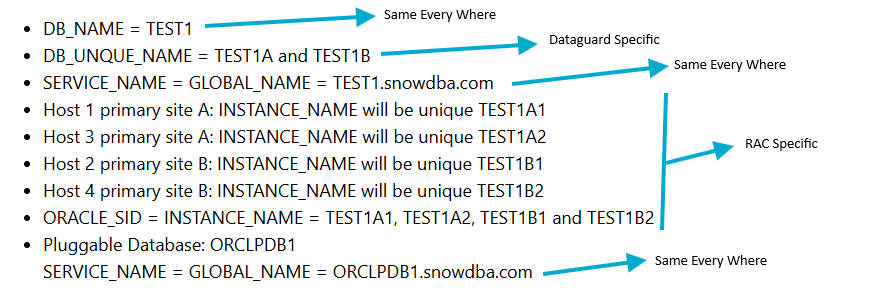
- DB_NAME = DB_UNQUE_NAME = TEST1
- SERVICE_NAME = GLOBAL_NAME = TEST1.snowdba.com
- Host 1 primary site A: INSTANCE_NAME will be unique TEST1A1
- Host 3 primary site A: INSTANCE_NAME will be unique TEST1A2
- ORACLE_SID = INSTANCE_NAME = TEST1A1 and TEST1A2
- Pluggable Database: ORCLPDB1
- SERVICE_NAME = GLOBAL_NAME = ORCLPDB1.snowdba.com
Step 6 Add Dataguard to the setup
- We will now have 2 more Unix Hosts for Disaster Recovery also setup as 2 node RAC, we will refer to this as site B
host2 + host4 # using even numbers for standby SiteAt this final point we now have